Optmetics: Turning Complexity into Clarity
Optmetics brings invoicing, billing, sales, inventory, expenses and business reports into one organised workspace, so you can manage everyday operations with clearer visibility as your business grows.
- Invoicing & billing
- Sales
- Inventory
- Expenses
- Reports
Built for growing businesses in India.
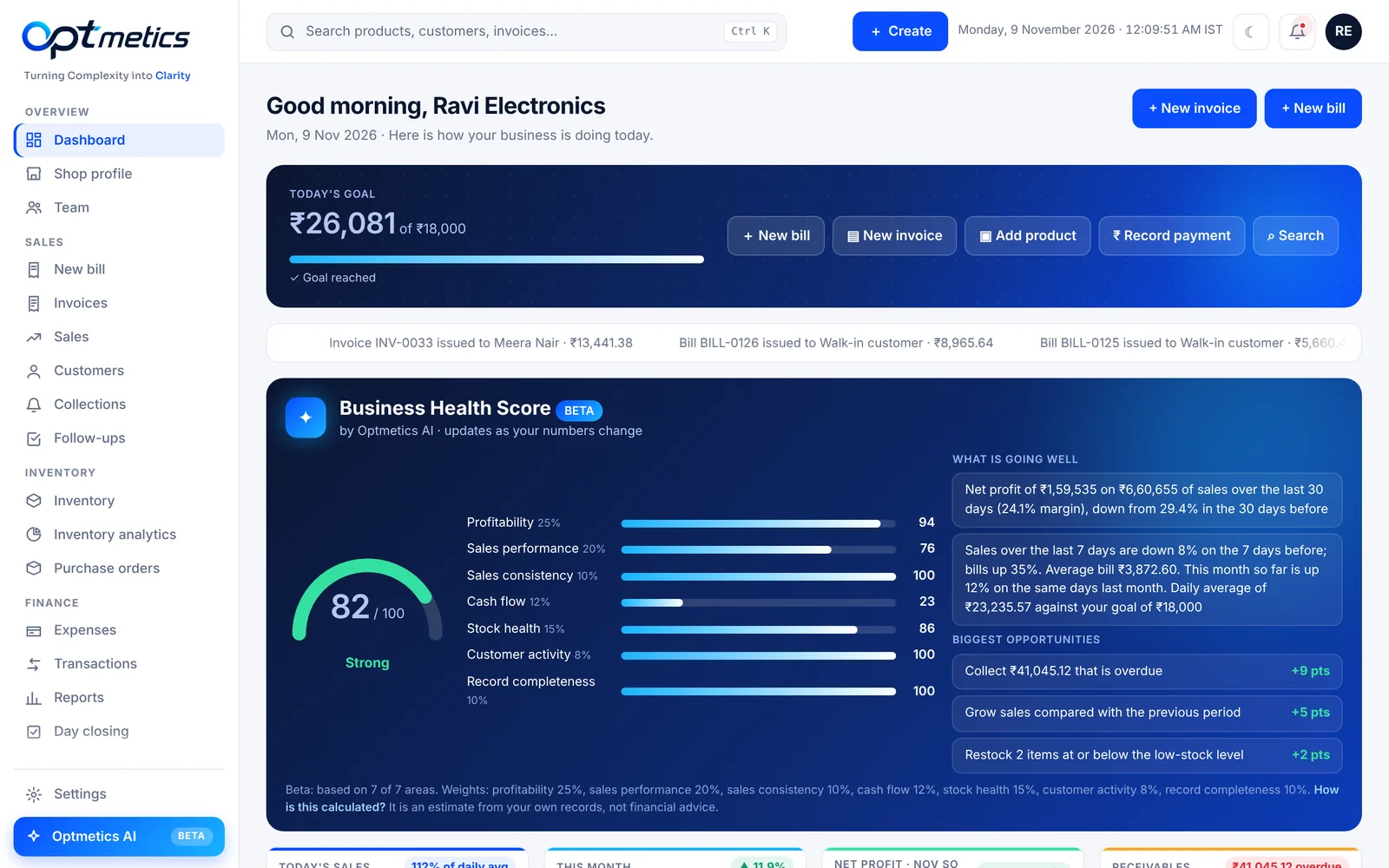
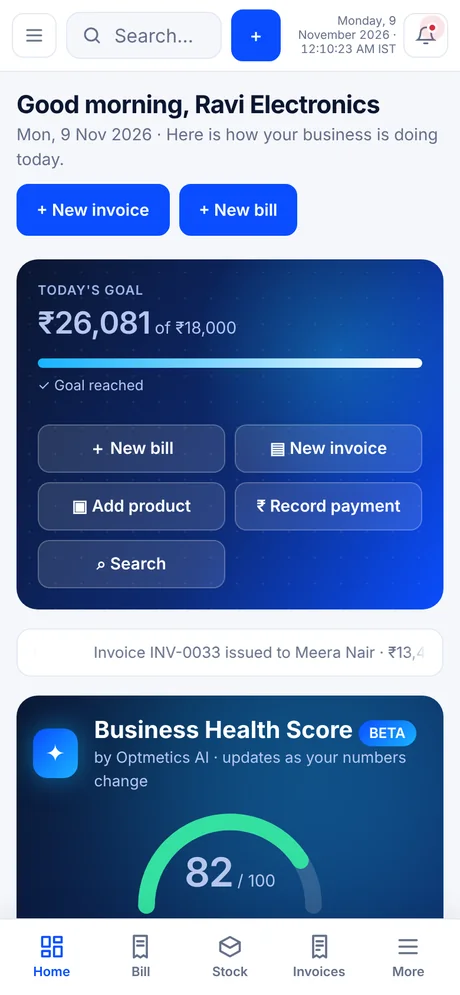
Screenshots show a sample business, Ravi Electronics. All names and figures are fictional.
One organised platform for the way your business runs
Optmetics is business management software designed to bring important business operations into one organised platform. It is for businesses that want a centralised way to manage invoices, billing, sales, inventory, expenses and business information, and to keep clear visibility as they grow.
Learn more about Optmetics →See your business clearly
A closer look at the screens businesses use every day, shown with the sample business Ravi Electronics.
Today at a glance
Open Optmetics and see how the day is going before you do anything else.
- Today’s sales against your daily goal
- Business Health Score (beta) with clear next steps
- Monthly sales, net profit and receivables at a glance
Professional documents, ready to share
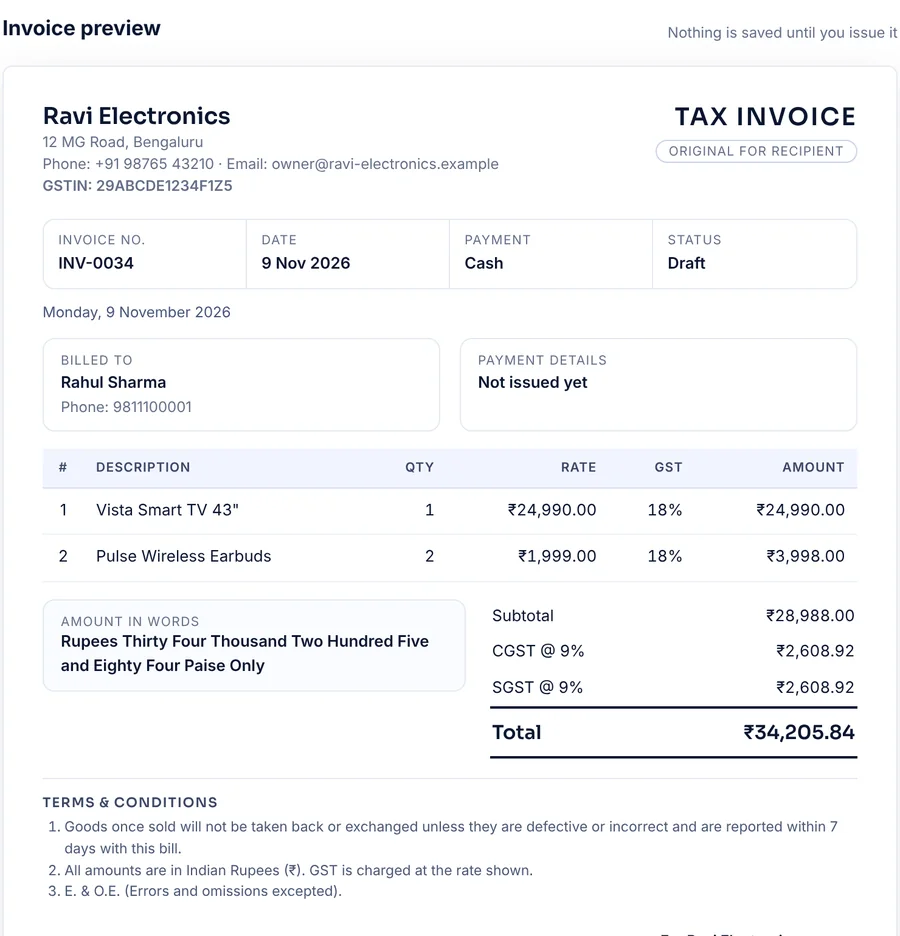
Create bills and invoices that look the way you want.
- Your logo, GSTIN and terms on every document
- Itemised lines, tax rates you set, round-off and amount in words
- Preview first, then print, save as PDF or share
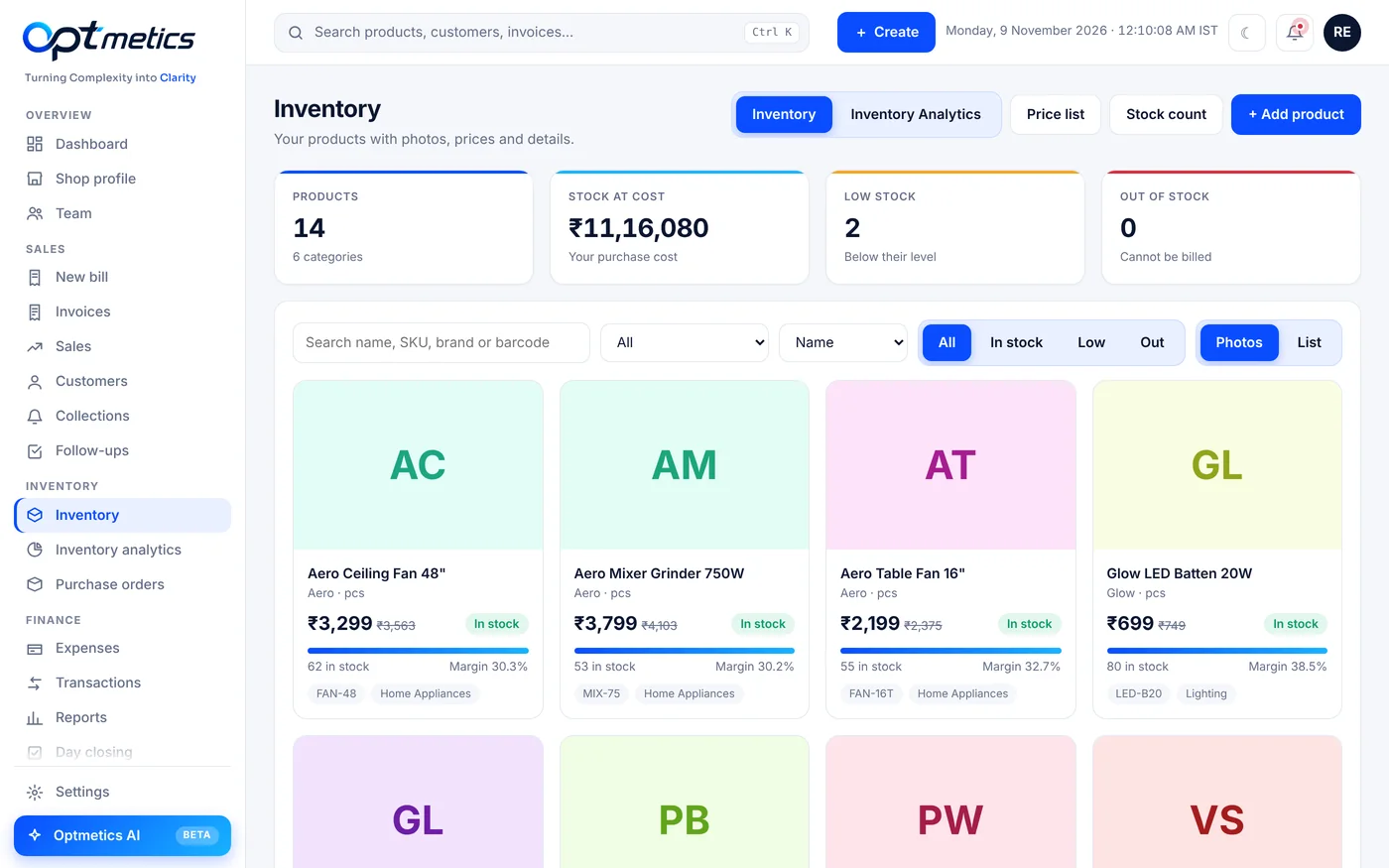
Inventory that stays up to date
Know what you have, what is running low and what just moved.
- Products with SKU, category, prices and photos
- Low-stock and expiry alerts
- A history of every stock change, and purchase orders received into stock
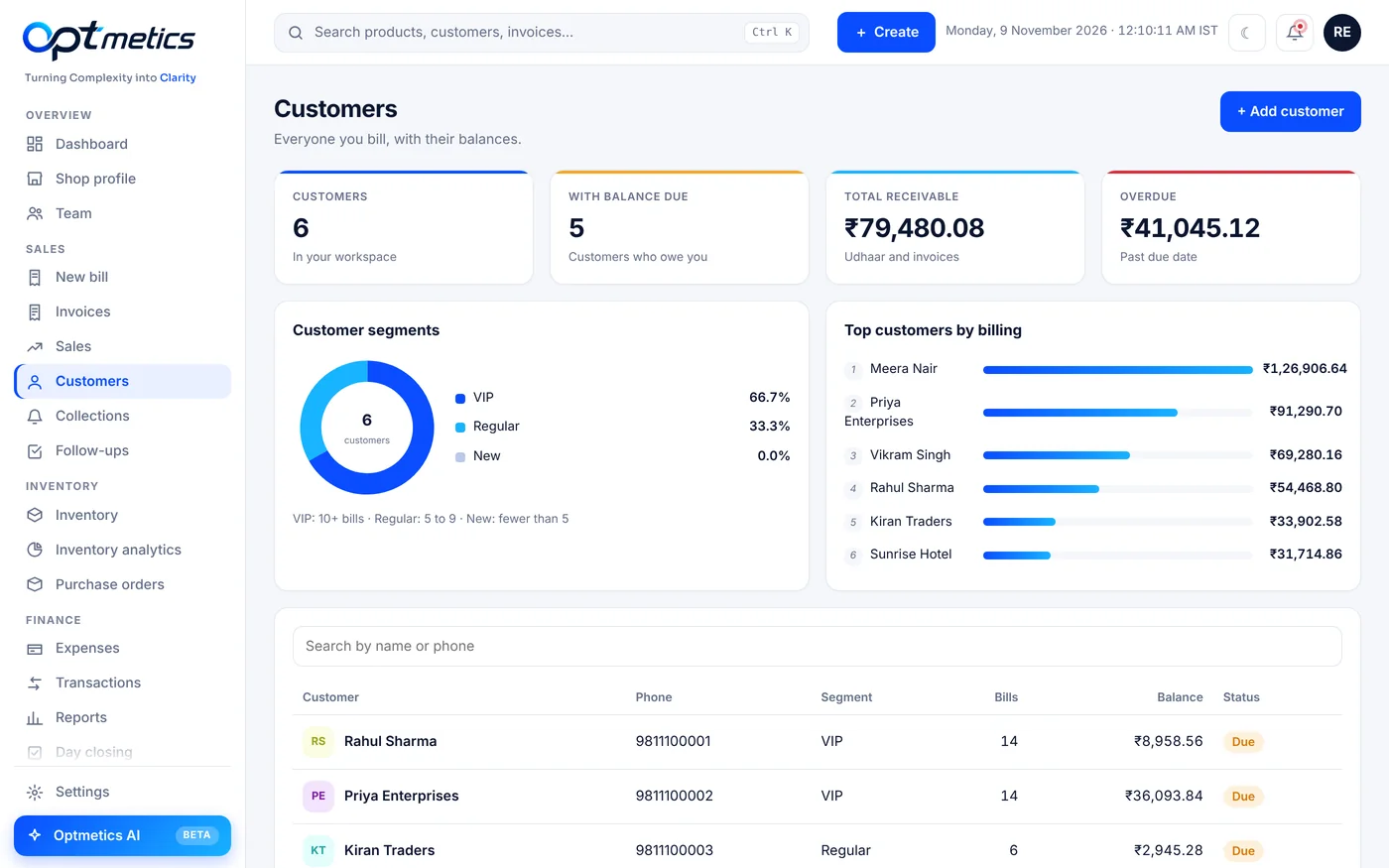
Customers and credit, organised
Keep every customer’s bills and balance together, including Udhaar.
- Everyone you bill, with their balances
- See who owes you and what is overdue
- Customer segments and your top customers by billing
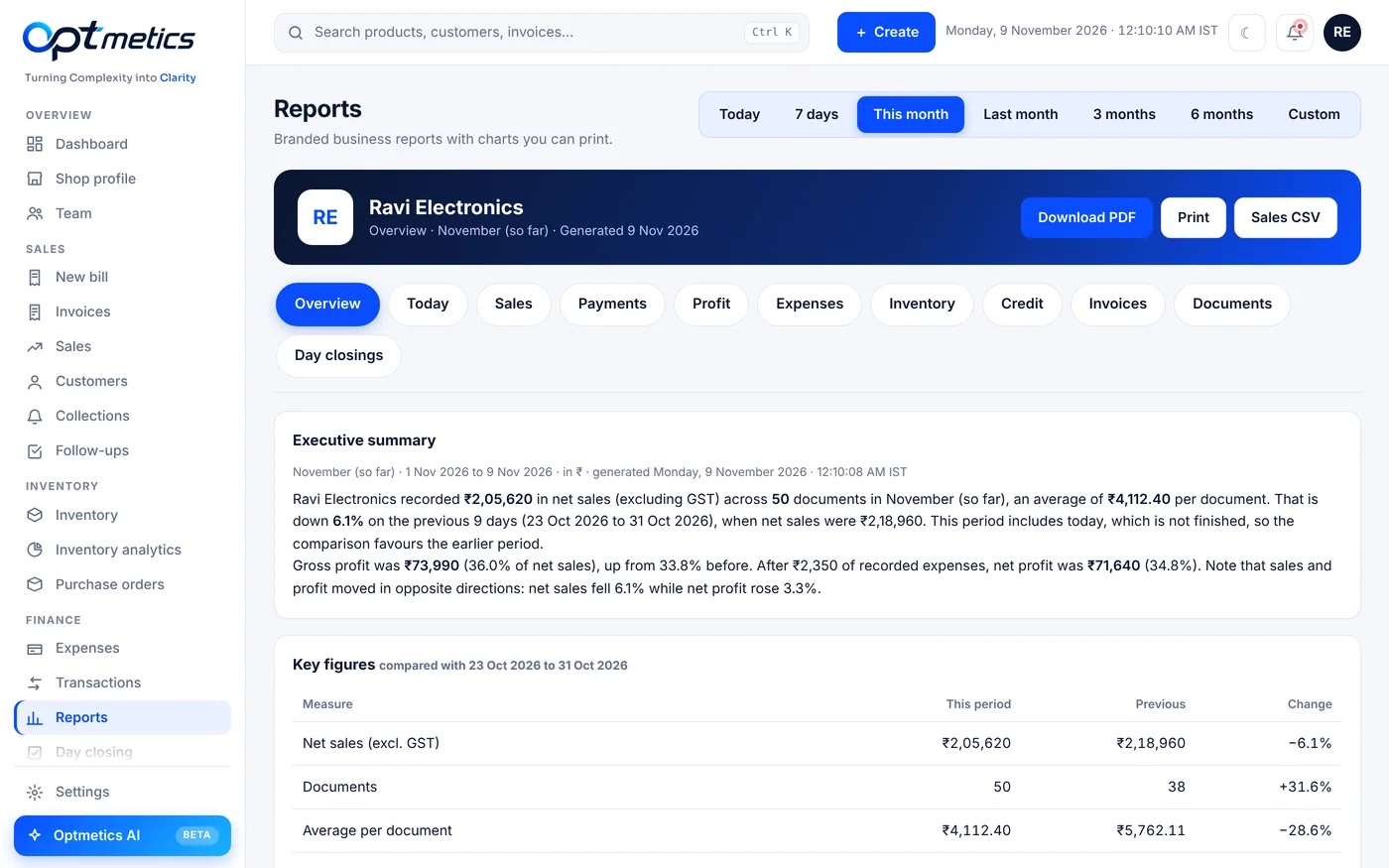
Reports from your own numbers
Understand performance with branded reports you can print.
- Sales, profit, inventory and credit reports
- Download as PDF, print, or export sales to a spreadsheet
- Compare this period with the one before it
Core business management, in one workspace
The everyday areas of running a business, connected so they stay consistent.
Invoicing & billing
Create and manage professional invoices and bills, with a preview before you issue.
See in features →Sales
Track sales and transactions, and see how each day, week and month is going.
See in features →Inventory
Monitor products, stock levels, low-stock alerts and every stock movement.
See in features →Expenses
Keep business expenses organised by category and review them next to sales.
See in features →Reports
Understand performance through sales, profit, inventory and credit reports.
See in features →Business management
Customers, credit, purchases and team records, organised in one place.
See in features →Enter it once. See it everywhere.
One bill updates everything it touches, so your records stay consistent without double entry.
Issue a bill or invoice
Tax, discount and payment mode on one screen.
Stock updates
Quantities drop and every change is logged.
Customer balance
Credit sales become Udhaar with a due date.
Reports
Sales and profit reflect it straight away.
Optmetics AI is on the way
Optmetics AI, an assistant for your business records, is in development. Early Business Health Score insights are already available in beta on the dashboard, clearly labelled as estimates based on your own records.
Plans can change. Features are described here only when they are available.
Why Optmetics
Your business is growing. Optmetics helps you manage it, with clarity at every step.
One place for your business
Invoices, stock, customers, expenses and reports live together, so a single bill updates everything it touches.
Clearer business management
See what is selling, what is running low and who owes what, without piecing information together.
Designed for everyday business
Billing, restocking and closing the day are built around how shops and small businesses really work.
Built with security in mind
Email-verified sign-in, a private workspace for your account and backups you control. See our Privacy Policy.
Billing, invoicing and inventory software for retail shops, grocery and general stores, pharmacies, electronics and clothing stores, restaurants and cafes, and wholesalers in India.
How it works
Simple on purpose.
Create your account
Set up your Optmetics account with your business details and email address.
Set up your business
Add your business information, logo, GST details and products.
Manage your business
Use Optmetics for invoices, billing, sales, inventory, expenses and reports.
Built to be dependable
Credibility comes from clear information and careful practices. Read our Privacy Policy, Terms & Conditions and Refund Policy any time.
Transparent policies
Privacy, terms and refund information are public and written in plain language.
No ads, no tracking
Optmetics does not run advertising or analytics trackers.
Your data, your control
Download a full backup at any time, or delete your account from Settings.
A clear way to reach us
Questions go to optmetics@gmail.com. We reply to every message we receive.
Learn more about Optmetics
Everything Optmetics offers today, who is behind it and quick answers, each on its own page.
Optmetics features
Invoicing and billing, sales, inventory, expenses, customer credit, reports and the dashboard, explained one topic at a time.
About Optmetics
Why Optmetics exists, how it works and what we mean by Turning Complexity into Clarity.
Questions and answers
Short, accurate answers about accounts, data, security, plans and getting started.
Optmetics features
Invoicing, billing, sales, inventory, expenses and reports, connected in one workspace. Choose a topic to see what Optmetics offers today.
Invoicing & billing
Create professional documents in the standard Indian format, with a preview before anything is issued.
- Bills and invoicesCreate quick bills for the counter or invoices for named customers.
- Standard Indian formatItemised lines, tax rates you set, round-off and amount in words.
- Preview, then issueCheck the document first; nothing is saved until you issue it.
- Print, PDF and sharePrint, download as PDF or share through your device.
- Your business detailsYour logo, name, address, GSTIN and UPI ID appear on documents, with editable terms and conditions.
- Optional brandingSwitch the small Optmetics mark off for a clean, unbranded document.
Sales
Keep a clear record of what you sell and when.
- Sales recordsEvery issued bill or invoice is stored as a sales record.
- TransactionsSearch and filter transactions by period, type and status.
- Payment modesRecord cash, UPI and card payments, or mark a sale as credit.
Inventory
Know what you have, what is running low and what changed.
- Product managementSKU, category, brand, unit, cost, MRP, selling price and optional product photos.
- Stock trackingLive stock levels that update when you bill or receive stock.
- AlertsLow-stock, out-of-stock and expiry alerts.
- Stock historyA history of every stock movement and why it happened.
- Inventory analyticsA closer look at stock value and product performance.
- Purchase ordersOrder from suppliers and receive stock straight into inventory.
Expenses
Keep spending organised and visible.
- Expense trackingRecord expenses by category: rent, salaries, utilities, transport, marketing, supplies, taxes and fees, and other.
- Day closingClose the day with cash and balance figures that add up.
Reports
Understand performance from your own records.
- Business reportsSales, profit, inventory and credit reports.
- Print and exportPrint reports or export them to a spreadsheet-friendly CSV file.
- Profit informationSee sales, costs and expenses side by side to understand margins.
Dashboard
Today at a glance, with the figures that matter.
- Business overviewToday’s sales against your goal, this month’s sales, net profit and receivables.
- Alerts and activityStock alerts, due payments and a feed of recent activity.
- Business Health Score BetaAn estimate built from your own records, with suggestions on where to look. It is not financial advice.
Business management
Customers, credit and team records in one place.
- Customers and UdhaarCustomer records, credit balances and part-payments.
- Collections and follow-upsDue dates and ready-made reminder messages you can share.
- Team and rolesKeep staff records with roles that limit what each person can see and change, plus an access log.
Business settings & data
Set Optmetics up the way your business works.
- Business profileShop information, business type, GSTIN, UPI ID and business hours.
- Account settingsAppearance (light or dark), notifications and document defaults.
- Backup and restoreDownload a full backup, restore it on any device, or delete your account.
Optmetics AI, a full assistant, is on the way. Beta insights are available on the dashboard today. This section lists only features that are available now.
About Optmetics
Optmetics gives growing businesses one dependable place to manage invoicing, billing, sales, inventory, expenses and reports.
Turning Complexity into Clarity
What Optmetics is
Optmetics is business management software. It helps businesses manage essential operations such as invoicing, billing, sales, inventory, expenses and business reports from a single, organised workspace. It runs in a web browser, so it fits the way shops and small businesses already work.
The idea behind it
As a business grows, there is more to keep track of: more products, more sales, more invoices, more expenses and more customers. That growth is an opportunity, and it also makes organisation more important. Optmetics was created to give growing businesses one dependable place to manage these operations, so that information stays connected and easy to understand.
Our guiding principle
This is our guiding principle. Complexity is the sum of many small tasks: preparing a bill, adjusting stock, recording a payment, logging an expense, checking how the month is going. Clarity is seeing all of it together. In Optmetics, issuing a bill updates stock, customer balances and reports automatically, and the dashboard turns your own records into figures you can act on.
What Optmetics helps organise
- Invoices and bills
- Sales and transactions
- Products, stock levels and purchase orders
- Expenses and day closing
- Customers, credit and collections
- Reports and a dashboard of key business figures
See the details in Optmetics features.
Our approach
- Clear by default. One workspace for billing, stock, credit and reports.
- Honest numbers. Every figure comes from your own records. Estimates such as the Business Health Score are labelled as estimates.
- Your data, your control. You can download a backup or delete your account yourself.
- Careful with claims. We describe what Optmetics does today and do not promise outcomes it cannot guarantee.
Who it is designed for
Optmetics is designed for businesses that want an organised way to manage everyday operations: retail shops, grocery and general stores, pharmacies, electronics and clothing stores, restaurants and cafes, and wholesalers, whether they are establishing their processes or continuing to grow.
Where we are heading
We intend to keep improving Optmetics with a focus on simplicity and visibility. An AI assistant, Optmetics AI, is in development, and early Business Health Score insights are already available in beta. Plans can change, and we will describe new capabilities here once they are available.
One workspace for the work behind every sale
Each part of Optmetics is connected to the others, so a single entry is reflected everywhere it matters.
Invoicing and billing
Bills and invoices with your business details, tax rates you set and a preview before anything is issued.
Sales and customer credit
Every issued bill becomes a sales record, and Udhaar (credit), part-payments and collections stay in step.
Inventory and purchases
Products, stock levels, low-stock and expiry alerts and purchase orders received straight into stock.
Expenses and day closing
Expenses by category and a daily closing view, so you can see how each day went.
Reports and dashboard
Sales, profit, stock and credit figures from your own records, with CSV export and print.
Your account and data
Email sign-in, backup and restore, and the ability to delete your account and data yourself.
From sign-up to your first bill in three steps
1. Create your account
Enter your business details and email address and verify your email. It takes under a minute.
2. Set up your business
Choose your business type and default tax rate, then add your products and customers.
3. Run the day in one place
Issue bills, record payments and expenses, and check the dashboard and reports whenever you need to.
Billing and inventory software for the way Indian businesses work
Optmetics supports the everyday needs of shops and small businesses across India.
Made for everyday trade
- Retail shops, grocery and general stores
- Pharmacies, electronics and clothing stores
- Restaurants, cafes and wholesalers
Familiar ways of working
- Standard Indian invoice layout with amount in words
- Rupee amounts and Indian number formatting
- Udhaar (credit) tracking and collections
Clear, honest and in your control
Privacy
No advertising and no analytics or tracking scripts. Read exactly what we handle in the Privacy Policy.
Plain terms
Our Terms & Conditions and Refund Policy are public and written in plain language.
Real answers
Have a question? Check the FAQ or write to us at optmetics@gmail.com. You can also use the contact page.
Frequently asked questions about Optmetics
Short, accurate answers about what Optmetics does today, your data and how to get started.
About Optmetics
What is Optmetics?
Optmetics is business management software that helps businesses manage essential operations such as invoicing, billing, sales, inventory, expenses and business reports from one organised platform. Its guiding idea is Turning Complexity into Clarity. Read more about Optmetics.
How can Optmetics help my business grow?
Optmetics does not promise growth, but it supports businesses as they grow. It gives you clearer visibility into sales, inventory, expenses, invoices and performance, so you can manage operations more effectively and make better-informed decisions as the business expands.
Who is Optmetics designed for?
Optmetics is designed for businesses that want an organised way to manage everyday operations and keep clear visibility as they grow. During setup you can choose a business type such as retail shop, grocery and general store, pharmacy, electronics, clothing, restaurant or cafe, or wholesale.
Is Optmetics suitable for small businesses?
Yes. Optmetics is useful for businesses that want a structured, centralised way to manage daily operations, whether they are establishing their processes or continuing to grow.
Can Optmetics help me manage a growing business?
Yes. Optmetics provides one workspace where products, sales, invoices, expenses, stock and customer information stay organised as the business expands, so more activity does not mean more scattered information.
Using Optmetics
What can I manage with Optmetics?
You can manage invoices and bills, sales and transactions, products and inventory, purchase orders, expenses, customers and credit (Udhaar), collections, day closing, business reports and basic team records. See the full list on the features page.
How does Optmetics make business management easier?
It brings important business information and everyday activities into one platform. For example, issuing a bill updates stock, customer balances and reports automatically, which keeps your numbers consistent and easy to review.
How do I create an account?
Choose Get started, enter your business details and email address, and verify your email. A short setup then lets you choose your business type and default tax rate. You can change these later in Settings. Where it is available, you can also continue with Google from the sign-in screen.
Can I use Optmetics on my phone?
Optmetics runs in your web browser and adapts to phone, tablet and desktop screens, so you can use it wherever you manage your business.
Invoicing, billing and sales
Can I create professional invoices and bills?
Yes. Documents can show your business name, logo, address and GSTIN, an itemised table with tax rates you set, round-off, amount in words and your own terms and conditions. You preview a document before issuing it, then print, save as PDF or share it.
Can I manage billing and customer credit?
Yes. You can record part-payments, track what each customer owes (Udhaar), see due dates in Collections and follow-ups, and share reminder messages.
Does Optmetics track sales?
Yes. Every issued bill or invoice becomes part of your sales and transaction records, which feed the dashboard and reports.
Inventory, expenses and reports
Can I manage inventory?
Yes. Add products with SKU, category, prices, stock level and optional photos. Optmetics shows stock levels, low-stock and expiry alerts and keeps a history of every stock change. Purchase orders can be received straight into inventory.
Can I track expenses?
Yes. Record expenses by category, such as rent, salaries, utilities, transport and marketing, and review them alongside sales and profit.
Can Optmetics help me understand my business performance?
Yes. The dashboard and reports show sales, expenses, profit, inventory, credit and related information from your own records. A Business Health Score (currently in beta) summarises how the business is doing and suggests areas to look at. It is an estimate based on your data, not financial advice.
Can I export my reports?
Yes. Reports can be printed or exported to a spreadsheet-friendly CSV file.
Account, data and security
Is my business data protected?
Optmetics uses account sign-in with email verification, and your workspace is saved to your own account with access restricted to you. Passwords are handled by a managed sign-in service rather than stored by the application. No system can promise absolute security, so we also recommend a strong password, a device screen lock and regular backups. Details are in the Privacy Policy.
Where is my data stored?
Your workspace is saved to your Optmetics account, hosted on Supabase, and a copy is cached in your browser so the app opens quickly.
Can I download my data or delete my account?
Yes. In Settings you can download a full backup, restore it later, and delete your account and its data.
Does Optmetics use advertising or tracking?
No. Optmetics does not run advertising and does not use analytics or tracking scripts on the application or on this website.
Plans, policies and support
Is Optmetics free?
The current edition is provided free of charge. If paid plans are introduced, prices and terms will be shown clearly before you buy. See the Refund Policy.
Where can I read the terms and privacy information?
Our Terms & Conditions, Privacy Policy and Refund Policy are available to everyone without signing in.
How do I contact support?
Email us at optmetics@gmail.com. You can also find Optmetics on Instagram and YouTube.
Still have a question? Email optmetics@gmail.com or use the contact page.
Contact Optmetics
Write to the Optmetics team.
Privacy Policy
What information Optmetics handles, where it is kept, how it is protected and the choices you have.
This page is general information about how Optmetics works. It is not legal advice.
1. Summary
Optmetics is business management software. This policy explains what information Optmetics handles, where it is kept, how it is protected and what choices you have.
- Your account and business data are saved to your Optmetics account, which is hosted on Supabase, and cached in your browser.
- Optmetics does not run advertising and does not use analytics or tracking scripts, on the application or on this website.
- Optmetics does not sell your information.
2. Information we handle
Depending on how you use Optmetics, this may include:
- Account and authentication information: email address, and a password handled by the sign-in service. If you choose Continue with Google, basic profile details such as your name and email address are provided by Google.
- Business information: business name, owner name, phone number, address, GSTIN, UPI ID, business type, business hours and settings.
- Business records you create: products, stock movements, customers and balances, bills, invoices, payments, purchase orders, expenses, tasks and activity history.
- Content you upload: your business logo and product images.
- Information required to provide the service: the technical data needed to keep you signed in and to save and load your workspace.
Customer details you record, such as names and phone numbers, are information about other people. You are responsible for handling them lawfully.
3. How information is used
We use information only to provide Optmetics: signing you in, preparing documents, calculating totals, tracking stock and credit, producing reports and showing alerts. We do not use your business records for advertising or to profile you.
4. Data storage
Your profile and workspace are saved to your Optmetics account, which is hosted on Supabase, a database and authentication provider. A copy is cached in your browser’s local storage so the application opens quickly. If your browser blocks local storage, Optmetics warns you.
5. Security measures
Optmetics uses email-verified accounts, a managed sign-in service that stores your password securely, and account-based access rules designed so that your workspace is available to you and not to other users. The application is served with restrictive browser security settings.
No system can be guaranteed to be completely secure. We recommend a strong, unique password, a screen lock on your device, signing out on shared computers and downloading backups regularly.
6. Data sharing and third-party services
We do not sell or rent your information. Optmetics relies on the following third parties to operate:
When you choose to share a document, for example through your device’s share menu or WhatsApp, the text of that document is passed to the app you select, and that app’s own privacy policy applies. Backups and exports you download are saved on your device; keep them private.
- Supabase for database hosting and sign-in.
- Google, only if you choose Continue with Google.
7. Cookies and local storage
Optmetics uses your browser’s local storage and session storage to keep you signed in, cache your workspace and remember preferences. If you choose Remember me, your sign-in is kept for up to 30 days. We do not use advertising or tracking cookies. This public website does not set cookies.
8. Your rights and choices
You can view, edit and export your information inside Optmetics at any time. Under the Digital Personal Data Protection Act, 2023 and other applicable laws you may have rights over your personal data, such as access, correction and erasure. To exercise a right that you cannot exercise inside the application, contact us.
9. Account and data deletion
In Settings, under Data & backup, you can delete your account. This permanently removes your account and its data from Optmetics, including from the cloud, and cannot be undone. Backup files you have downloaded are not deleted automatically.
10. Children
Optmetics is intended for business use by adults and is not directed at children.
11. Changes to this policy
We may update this policy. The date at the top shows the latest version. If the way Optmetics handles data changes significantly, we will make that clear.
12. Contact
For privacy questions or requests, email optmetics@gmail.com.
Terms & Conditions
The terms that apply when you create an account and use Optmetics.
This page is general information about how Optmetics works. It is not legal advice.
1. Acceptance of terms
By creating an account or using Optmetics you agree to these Terms & Conditions. If you do not agree, please do not use Optmetics.
2. About Optmetics
Optmetics is a software tool that runs in your web browser. It helps you prepare bills and invoices, track stock, record customer credit, log expenses and view reports. It is not an accounting firm, a tax advisor or a legal advisor.
3. Account registration and responsibility
- You must provide accurate information and keep it up to date.
- You are responsible for keeping your sign-in details secure and for the access you give to team members. Anything done through your account is treated as done by you.
- Sign out on shared or public devices, and tell us if you suspect unauthorised access.
4. Business information and records
Your business data belongs to you. It is saved to your Optmetics account and cached in your browser. You remain responsible for keeping your own backups, which you can download from Settings.
5. Invoices and business records
Documents are generated from the information you enter, such as prices, quantities, GST rates, GSTIN and customer details. You must check every document before issuing it.
You are solely responsible for the accuracy and legality of your documents, for charging and reporting GST correctly, and for meeting all invoicing, tax, accounting and record-keeping obligations that apply to your business. Take professional advice if you are unsure.
6. Acceptable use and prohibited activities
Use Optmetics lawfully and for genuine business purposes. You must not:
- issue false or misleading documents or use Optmetics to evade tax;
- upload content you have no right to use, such as another person’s logo;
- attempt to access other users’ data, damage the service, or interfere with its normal operation.
7. Subscription and payment terms
The current edition of Optmetics is provided free of charge. If paid plans are introduced, prices, billing periods and cancellation rules will be shown clearly before you buy and will need your agreement at that time. See the Refund Policy.
8. Intellectual property
You keep all rights in the logo, business details and other content you add. The Optmetics name, logo, tagline and software belong to Optmetics. The small Optmetics mark on documents can be switched off in Settings.
9. Service availability and changes to the service
Optmetics is provided on an as-is and as-available basis. Features may change, improve or be removed over time, and the service may be unavailable from time to time, for example for maintenance.
10. Account suspension and termination
You may stop using Optmetics at any time and can delete your account from Settings. We may suspend or end access to accounts that breach these terms or put the service or other users at risk.
11. Data and privacy
How we handle information is described in the Privacy Policy.
12. Third-party services
Optmetics relies on third-party services such as Supabase for hosting and sign-in, and Google if you choose Continue with Google. Their own terms and policies apply to their services. When you share a document through another app, that app’s terms apply.
13. Disclaimer and limitation of liability
We work to make Optmetics accurate and reliable but do not promise that it will be error-free, uninterrupted or suitable for every purpose. Calculations, reports and insights are aids to your own judgement and are drawn only from the data you enter.
To the fullest extent permitted by law, Optmetics and its creators are not liable for indirect, incidental or consequential loss, loss of profit, loss of data or business interruption arising from your use of the application, including loss resulting from not keeping a backup, incorrect data you entered, or documents not meeting a legal requirement. Nothing in these terms limits any right you have under law that cannot be limited, including consumer-protection rights.
14. Changes to these terms
We may update these terms. The date at the top shows the latest version. Continuing to use Optmetics after an update means you accept the updated terms.
15. Governing law
These terms are governed by the laws of India. Subject to any rights you have under applicable consumer law, disputes are subject to the courts of India that have jurisdiction.
16. Contact
For questions about these terms, email optmetics@gmail.com.
Refund Policy
How refunds and cancellations work for Optmetics.
This page is general information about how Optmetics works. It is not legal advice.
1. Current edition
The current edition of Optmetics is provided free of charge, so there is nothing to refund.
2. If paid plans are introduced
Prices, billing periods, cancellation and refund rules will be shown clearly before you buy and will need your agreement at that time. Refunds will follow those published rules and the consumer-protection laws that apply, and this page will be updated when paid plans are introduced.
3. Stopping and deleting your account
You can stop using Optmetics, or delete your account from Settings, at any time. No charge is made for doing so while Optmetics is free.
4. Refunds you give to your customers
Optmetics does not process payments or refunds between you and your customers. How you handle returns and refunds to your customers is your decision, and the terms printed on your documents are text you control.
5. Contact
Questions about refunds: email optmetics@gmail.com.